 BookGram (WWW/PHP)
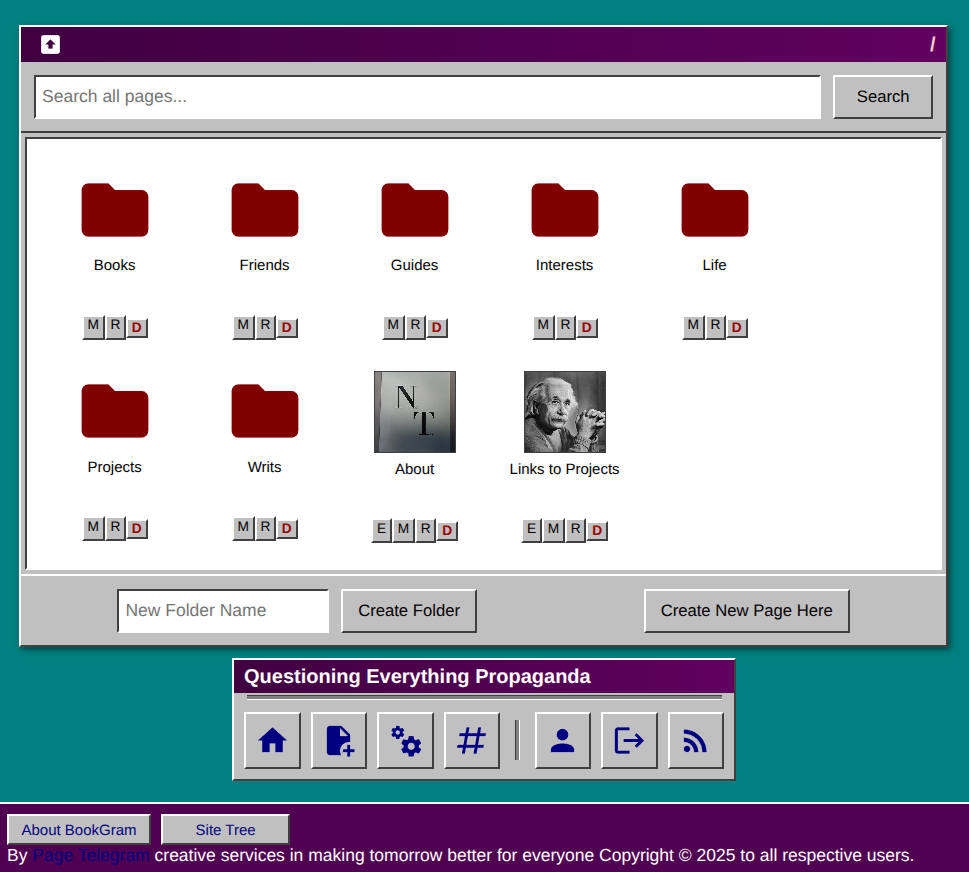
BookGram (WWW/PHP)
Current Version: 10.05.0
59
Unique Views
0
Free Downloads
0
Donation Downloads
BookGram Version 10.05
A lightweight, hierarchical content management system with an IBM OS/2 Warp aesthetic and powerful plugin ecosystemOverview
BookGram is a file-based content management system (CMS) designed for simplicity, efficiency, and extensibility. It features a hierarchical folder-based organization system, complete revision control, and a nostalgic IBM OS/2 Warp 3 themed interface. No database required - all content is stored in simple JSON files, making backups and version control straightforward. Version 10.05 introduces a comprehensive plugin system with five built-in plugins (TaskGram, SocialGram, ChatGram, JoinGram, PlayList), page image management, HTML/PHP embedding capabilities, and advanced content features.Key Features
Content Management
- Hierarchical File Browser: Organize content in nested folders like a traditional file system
- Markdown & HTML Support: Write using simple Markdown syntax or full HTML
- Table Support: Full support for Markdown tables with responsive design
- Image Support: Upload and manage multiple images per page with markdown integration
- Revision History: Complete version control with ability to view, revert, and delete revisions
- Feature Images: Add visual appeal with customizable feature images for pages
- Private Pages: Create password-protected pages with secure share links
- Hashtag System: Tag content with hashtags for easy categorization and search
- HTML Embeds: Embed static HTML files with sandboxed iframe rendering
- PHP Embeds: Execute interactive PHP scripts with parameter controls and security blacklisting
- Multi-User Support: Role-based permissions with three levels: - Admin: Full system access, user management, settings - Editor: Create and edit pages, upload images - Viewer: Read-only access to public content
- User Profiles: Personal profiles with avatars, bios, and author pages
- Session Management: Secure authentication with "Remember Me" functionality
- Full-Text Search: Search across all content with keyword matching
- Hashtag Search: Find content by hashtag tags
- Site Tree: Visual hierarchical view of entire site structure
- RSS Feed: Automatic RSS feed generation for latest content
- OS/2 Warp Theme: Classic 1990s IBM aesthetic with 3D borders and gradients
- Movable Launchpad: Draggable navigation toolbar (desktop)
- Mobile Responsive: Fully optimized for smartphones and tablets
- Print Friendly: Optimized CSS for printing pages
- Extensible Architecture: Modular plugin system with automatic discovery
- Instance-Based: Multiple plugin instances per page with isolated data
- Built-in Plugins: Five powerful plugins included out of the box
- Shortcode Embedding: Simple
[plugin:name id=instance]syntax - Admin Panels: OS/2-themed configuration modals for each plugin
- Token Authentication: Secure plugin admin access with session passthrough
- Developer Friendly: Well-documented API for creating custom plugins
- Add, edit, delete, and complete tasks
- Optional due dates and times with color-coded badges (overdue/today/future)
- Completion pool for finished tasks with restore capability
- Real-time search across all tasks
- Export to CSV (active/completed) and iCal (tasks with due dates)
- Role-based permissions (read-only for guests, full access for editors/admins)
- Statistics dashboard showing active, completed, and overdue counts
- Usage:
[plugin:taskgram id=my-tasks] - Nested replies (4 levels deep)
- Image uploads and media embedding (YouTube, Vimeo)
- Guest posting with custom handles
- Admin moderation tools (edit/delete posts)
- Search functionality across discussions
- Real-time updates via AJAX
- Privacy controls per instance
- Usage:
[plugin:socialgram id=discussion] - Live messaging with 3-second AJAX polling
- Private 1-on-1 direct messages
- Guest access with custom handles
- Online user presence indicators
- Message history
- Rate limiting and spam protection
- User typing indicators
- Usage:
[plugin:chatgram id=chat-room] - Drag-and-drop form designer
- 10+ field types (text, textarea, dropdown, checkbox, radio, email, number, date, HR divider, etc.)
- Markdown support in form titles and descriptions
- Submission tracking with unique IDs and IP addresses
- CSV export of all responses
- Form change history logging
- Response management dashboard
- Usage:
[plugin:joingram id=signup-form] - Playlist organization and management
- YouTube video integration
- Audio player controls
- Track metadata support
- Embedded player for pages
- Usage:
[plugin:playlist id=my-playlist] - PHP: 7.4 or higher
- Web Server: Apache, Nginx, or similar
- Storage: File system access (no database required)
- Extensions: -
- HTTPS enabled for secure password transmission
.htaccesssupport (Apache) or equivalent URL rewriting- 256MB+ PHP memory limit for large file uploads
User Management
Search & Discovery
Interface & Design
Plugin System
Included Plugins
TaskGram - Todo List Manager
Complete task management system with:SocialGram - Discussion & Social Feed
Threaded discussion system featuring:ChatGram - Live Chat
Real-time IRC-style chat with:JoinGram - Forms & Surveys
Powerful form builder including:PlayList - Audio Management
Audio and video playlist manager with:System Requirements
Server Requirements
json (usually enabled by default)
- fileinfo (for image uploads)
- session (for user authentication)
Recommended
Installation & Deployment
Step 1: Download and Extract
bash
Extract BookGram files to your web directory

cd /var/www/html
unzip bookgram-v802.zip
cd shavidica
Step 2: Set Permissions
bash
Make storage directories writable

chmod -R 755 app/storage
chmod -R 755 public/uploads

Ensure PHP can write to these directories

chown -R www-data:www-data app/storage
chown -R www-data:www-data public/uploads
Step 3: Configure Web Server
#### Apache (.htaccess) BookGram includes an.htaccess file for Apache. Ensure mod_rewrite is enabled:
bash
sudo a2enmod rewrite
sudo systemctl restart apache2
nginx
location / {
    tryfiles $uri $uri/ /index.php?$querystring;
}

location ~ \.php$ {
    fastcgi_pass unix:/var/run/php/php7.4-fpm.sock;
    fastcgi_index index.php;
    include fastcgi_params;
    fastcgiparam SCRIPTFILENAME $documentroot$fastcgiscript_name;
}
Step 4: Run Setup
Navigate to your BookGram installation in a web browser:
http://yourdomain.com/setup.php
Step 5: Remove Setup File
After setup is complete:bash
rm setup.php
Step 6: Login
Navigate to/login and use your admin credentials to access the system.
Directory Structure
bookgram/
├── app/
│   ├── core/
│   │   ├── auth.php           # Authentication & user management
│   │   ├── functions.php      # Core CMS functions
│   │   ├── plugins.php        # Plugin system core
│   │   ├── plugin_auth.php    # Plugin authentication
│   │   └── Parsedown.php      # Markdown parser
│   └── storage/
│       ├── pages/             # Content files (JSON)
│       ├── revisions/         # Revision history (TXT)
│       ├── page_images/       # Per-page image storage
│       ├── plugin_instances/  # Plugin data (per page/instance)
│       ├── users.json         # User accounts
│       ├── config.json        # Site configuration
│       ├── uuid_index.json    # UUID to path mapping
│       └── plugin_registry.json # Plugin cache
├── public/
│   ├── css/
│   │   ├── style.css          # Main stylesheet
│   │   ├── print.css          # Print styles
│   │   └── os2-theme.css      # OS/2 Warp theme
│   ├── js/
│   │   ├── main.js            # JavaScript utilities
│   │   └── plugin-admin-modal.js # Plugin modal system
│   └── uploads/               # User-uploaded images (features/avatars)
├── templates/
│   ├── partials/
│   │   ├── header.php         # Site header
│   │   └── footer.php         # Site footer
│   ├── browser.php            # Folder browser view
│   ├── page.php               # Page display with plugin rendering
│   ├── edit.php               # Page editor with image/plugin managers
│   ├── profile.php            # User profile
│   └── ...                    # Other templates
├── embeds/                    # HTML embed files
├── php_embeds/                # PHP embed scripts
├── plugin_taskgram/           # TaskGram plugin
├── plugin_socialgram/         # SocialGram plugin
├── plugin_chatgram/           # ChatGram plugin
├── plugin_joingram/           # JoinGram plugin
├── plugin_PlayList/           # PlayList plugin
├── index.php                  # Main router
├── ABOUT.md                   # This file
├── CHANGELOG.md               # Version history
├── PLUGINSYSTEMGUIDE.md     # Plugin development documentation
├── HTMLEMBEDIMPLEMENTATION.md # HTML embed guide
└── README.md                  # Quick start guide
Basic Usage
Creating Content
Organizing Content
Markdown Syntax Examples
markdown
Heading 1

Heading 2


Bold text and italic text

Bullet point 1

Bullet point 2


Numbered item

Numbered item


Link text

!Image alt text
!Page image

| Header 1 | Header 2 | Header 3 |
|----------|----------|----------|
| Cell 1   | Cell 2   | Cell 3   |
| Cell 4   | Cell 5   | Cell 6   |

#hashtag #another-tag


Using Page Images
markdown
!Optional description

Embedding Plugins
markdown
[plugin:taskgram id=my-tasks]
[plugin:socialgram id=discussion]
[plugin:chatgram id=chat-room]
[plugin:joingram id=contact-form]
[plugin:playlist id=music]
Embedding HTML Files
/embeds/ directory
markdown
[html:filename.html]
[html:demo.html width=800 height=600]
[html:interactive.html class=centered sandbox=strict]
Embedding PHP Scripts
/php_embeds/ directory
php
/**
 * BOOKGRAM_PARAM: color | select | red,green,blue | red
 * BOOKGRAM_PARAM: size | range | 1-10 | 5
 */
markdown
[php:script.php]
[php:visualization.php color=blue size=7]
Using Hashtags
Add hashtags anywhere in your content:
This page is about #documentation and #tutorials
#documentation
Creating Private Pages
Revision History
Every time you save a page, a new revision is created. To:Use Case Scenarios
1. Personal Knowledge Base
Scenario: Individual wants to organize personal notes, research, and documentation. Setup:/Technology/, /Health/, /Finance/, etc.
2. Team Documentation Portal
Scenario: Small team needs to collaborate on internal documentation. Setup:/Engineering/, /Marketing/, /HR/
3. Project Management Hub
Scenario: Managing multiple projects with notes, plans, and documentation. Setup:
/Projects/
  ├── Project-Alpha/
  │   ├── planning-notes
  │   ├── requirements
  │   └── meeting-minutes
  ├── Project-Beta/
  │   ├── design-docs
  │   └── implementation-plan
  └── Archive/
4. Educational Content Platform
Scenario: Teacher creating course materials and resources for students. Setup:
/Courses/
  ├── Math-101/
  │   ├── Syllabus
  │   ├── Lectures/
  │   ├── Assignments/
  │   └── Resources/
  └── Math-102/
5. Portfolio Website
Scenario: Creative professional showcasing work samples. Setup:
/Portfolio/
  ├── Web-Design/
  ├── Graphic-Design/
  ├── Photography/
  └── About-Me
6. Research Repository
Scenario: Researcher organizing papers, notes, and data. Setup:7. Small Business Website
Scenario: Local business needs simple content website. Setup:
/
├── About-Us
├── Services/
│   ├── Service-1
│   └── Service-2
├── Contact
└── Blog/
8. Family Wiki
Scenario: Family documenting history, recipes, and shared information. Setup:Advanced Features
UUID Linking
Create permanent links between pages using UUIDs:markdown
See also: Related Page
Custom Styling
Edit/public/css/style.css to customize the appearance. The OS/2 theme variables:
#c0c0c0
#400040 to #600060
#008080 (teal)
Footer Customization
Admins can add custom HTML to the footer via Admin Panel → Settings → Footer Prefix.Image Management
Images uploaded via the page editor are stored in:/public/uploads/features/
/public/uploads/avatars/
Backup & Maintenance
Backing Up
Simple backup process - copy these directories:bash
Backup all content and configuration
tar -czf bookgram-backup-$(date +%Y%m%d).tar.gz \
app/storage/ \
public/uploads/
Restoring
bash
Extract backup

tar -xzf bookgram-backup-20250101.tar.gz

Restore permissions

chmod -R 755 app/storage public/uploads
chown -R www-data:www-data app/storage public/uploads
Updates
index.php, app/core/, templates/)
app/storage/ and public/uploads/ intact
Security Considerations
Best Practices
setup.php after installation
Private Pages
password_hash() (bcrypt)
Troubleshooting
Common Issues
Problem: "Permission denied" errorsbash
Solution: Fix permissions
chmod -R 755 app/storage public/uploads
chown -R www-data:www-data app/storage public/uploads
bash
Apache: Enable mod_rewrite

sudo a2enmod rewrite
sudo systemctl restart apache2

Check .htaccess exists

ls -la .htaccess
bash
Check PHP upload limits in php.ini

uploadmaxfilesize = 10M
postmaxsize = 10M

Restart web server after changes

sudo systemctl restart apache2
templates/page.php line 27
Technical Specifications
Support & Contact
For sales inquiries, licensing, custom development, or technical support: Email: jsp@pagetelegram.comCredits
Download Options
Donation-Based Downloads: Support development with a donation via PayPal to receive source code and compiled binaries.
Source Code (Donation-Based)
Changelog
Changelog
All notable changes to Bookgram will be documented in this file. The format is based on Keep a Changelog, and this project adheres to Semantic Versioning.[10.05.0] - 2026-01-04
Added - TaskGram Plugin (NEW)
- Complete Task Management System - Todo list plugin embeddable in any page via
- Export Capabilities - Export active tasks as CSV file - Export completed tasks as CSV file - Export tasks with due dates as iCal calendar file (.ics format) - CSV includes: Task, Created date, Due date, Due time, Status, Completion date - iCal uses VTODO entries compatible with calendar applications
- Authentication & Authorization - Read-only view for guests and viewers - Full task management for editors and admins only - API endpoints protected with role-based authentication - Login prompt for guests who want to add/modify tasks
- Admin Panel - Configure task list title and description - View statistics: active tasks, completed tasks, tasks with due dates, overdue count - Bulk action to clear all completed tasks - Usage instructions and embedding help - Instance configuration with OS/2 Warp themed interface
- User Experience - IBM OS/2 Warp 3 aesthetic matching BookGram theme - Collapsible completion pool section - Responsive layout for mobile and desktop - Client-side search with instant filtering - Form validation and error handling - Loading states during API operations
- Multiple Images Per Page - Upload and manage multiple images associated with each page - Separate from feature images - dedicated image gallery per page - Images stored in
- Image Metadata - Unique image ID:
- Image Operations - Automatic resizing to max 2 megapixels for optimization - Access-controlled endpoint:
- Markdown Integration - Easy image insertion in markdown editor - Image browser shows all uploaded images for current page - Click to copy markdown syntax:
- Static HTML Embedding - Embed HTML files from
- Security Features - Three sandbox modes: default, strict, permissive - Path traversal protection - Only .html and .htm files allowed - Files served from dedicated
- Upload Browser - Web-based file browser for HTML files - Upload HTML files directly through interface - View existing HTML embeds - Delete unused HTML files - Copy shortcode for easy embedding
- Interactive PHP Embeds - Execute PHP code within sandboxed environment - Shortcode syntax:
- Parameter System - Define parameters in PHP comments:
- Security Blacklist - Extensive blacklist of dangerous PHP functions - Blocked: file operations, shell execution, network access - Blocked: eval, include, require, database access - Token-based static analysis before execution - Sandboxed iframe execution environment
- Plugin Discovery - Automatic plugin detection via
- Plugin Features - Instance-based architecture with separate data storage - Setup scripts for initialization - Admin panels with authentication - CSS and JavaScript file loading - Embed handlers for page rendering
- Plugin Authentication - Token-based authentication system - 1-hour token expiration - Session passthrough to plugins - Editor/admin permission requirements - Secure plugin admin access via
- Plugin Modal System - OS/2-themed draggable modal windows - Configure plugins without leaving page - Maximizable and minimizable modals - Auto-reload page after configuration -
- Threaded discussions (4 levels deep)
- Image uploads and media embeds
- YouTube and Vimeo video embedding
- Guest posting with handles
- Admin moderation (edit/delete posts)
- Search functionality
- Real-time updates
- Privacy controls per instance #### ChatGram - Live Chat
- Real-time IRC-style chat interface
- Private 1-on-1 messaging
- Guest access with custom handles
- AJAX polling (3-second intervals)
- Rate limiting
- User presence indicators
- Message history
- Online user list #### JoinGram - Forms & Surveys
- Drag-and-drop form builder
- Multiple field types: text, textarea, dropdown, checkbox, radio, email, number, date, HR divider
- Markdown support in titles and descriptions
- CSV export of submissions
- Submission tracking with IPs
- Form change history logging
- Unique submission IDs
- Response management dashboard #### PlayList - Audio Management
- Audio playlist management
- YouTube integration and embedding
- Playlist organization
- Track metadata support
- Audio player controls #### TaskGram - Todo List Manager
- Task creation and management
- Due date/time tracking with color coding
- Completion pool system
- Search across tasks
- CSV and iCal export
- Multi-instance support
- Role-based permissions
- Markdown Parser - Image support:
- Page Editor - Plugin manager with visual interface - Insert plugin shortcodes at cursor position - Configure plugin instances from editor - Image upload and management panel - Preview images before insertion
[plugin:taskgram id=instance-name]
- Add, edit, and delete tasks with descriptions
- Mark tasks as completed (moves to completion pool)
- Optional due date and time for each task
- Color-coded due date badges: Red (overdue), Yellow (today), Blue (future)
- Completion pool for managing finished tasks separately
- Restore completed tasks back to active list
- Delete individual completed tasks or clear entire completion pool
- Real-time search functionality across active and completed tasks
Added - Page Image Management System
/app/storage/page_images/{page-uuid}/
- Metadata tracking in images.json per page
img{timestamp}{random}
- Original filename preservation
- Optional description field for each image
- Upload timestamp and user tracking
- Image dimensions (width × height)
- File size tracking
/page-image/{page-uuid}/{filename}
- Images deleted automatically when page is deleted
- Support for JPG, PNG, GIF, WebP formats
!Description
- Preview images before insertion
Added - HTML Embed System
/embeds/ directory into pages
- Shortcode syntax: [html:filename.html]
- Sandboxed iframe rendering with security controls
- Optional parameters: width, height, class, sandbox mode
/embeds/ directory
- allow-scripts, allow-same-origin, allow-forms permissions
Added - PHP Embed System
[php:script.php]
- Parameter passing via URL query string
- Interactive form controls for parameters
BOOKGRAM_PARAM
- Parameter types: select, range, text, checkbox
- Auto-generated form controls
- URL parameter passthrough
Added - Plugin System Architecture
plugin_ prefix
- Plugin manifest system (plugin.json)
- Per-page instance isolation
- Multiple instances per page support
/plugin-admin/ route
plugin-admin-saved message system
Included Plugins
#### SocialGram - Discussion & Social FeedEnhanced
!alt text
- Inline images rendered with proper sizing
- Support for page-specific images via 
/page-image/ endpoint
- Image dimensions preserved in rendering
Technical Details - TaskGram
#### File Structure
plugin_taskgram/
├── plugin.json              # Manifest
├── setup.php                # Instance initialization
├── embed.php                # Main UI
├── admin/index.php          # Admin panel
├── api/
│   ├── task.php            # CRUD operations
│   ├── export-csv.php      # CSV export
│   └── export-ical.php     # iCal export
├── css/style.css            # OS/2 styling
└── js/taskgram.js          # Frontend JavaScript
json
{
  "id": "taskuniqueidtimestamp",
  "text": "Task description",
  "created_at": "YYYY-MM-DD HH:MM:SS",
  "updated_at": "YYYY-MM-DD HH:MM:SS",
  "due_date": "YYYY-MM-DD",
  "due_time": "HH:MM",
  "hasduedatetime": true,
  "completed_at": "YYYY-MM-DD HH:MM:SS",
  "order": 0
}
POST /plugin_taskgram/api/task.php
GET /plugintaskgram/api/export-csv.php?instanceid=X&type=active|completed
GET /plugintaskgram/api/export-ical.php?instanceid=X
Security Enhancements
htmlspecialchars()
- Task text limited to 500 characters
- Date/time format validation with regex
- File locking (LOCK_EX) to prevent race conditions
- Instance ID sanitization
- XSS prevention on all user input
- Role-based access control (Editor/Admin only for modifications)
File Locations Modified
/plugin_taskgram/                   - Complete new plugin (NEW)
/app/storage/page_images/           - Page image storage (NEW)
/embeds/                            - HTML embed directory
/php_embeds/                        - PHP embed directory
/app/core/plugins.php               - Plugin system core
/app/core/plugin_auth.php           - Plugin authentication
/templates/edit.php                 - Image manager, plugin manager
/templates/page.php                 - Image rendering, embed parsing
/HTMLEMBEDIMPLEMENTATION.md       - HTML embed documentation (NEW)
/PLUGINSYSTEMGUIDE.md             - Plugin development guide (NEW)
/PLUGINMODALSYSTEM.md             - Modal system documentation (NEW)
Backward Compatibility
[10.02.0] - 2025-12-20
Added - ChatGram Plugin
$SESSION['bookgramuser'] directly
- Ensures logged-in users are detected even if core functions don't work
- Username detection fallback to session data
- Role detection fallback to $SESSION['bookgramrole']
heartbeat.php and post.php
- Client-side console logging for authentication status
- Debug information in API responses showing session data
Added - JoinGram Plugin
bold to bold text
- Converts italic to italic text
- Automatically converts URLs to clickable hyperlinks opening in new window
- Converts newlines to <br> tags
sub[random][timestamp]
- IP address logging with proxy header support (X-Forwarded-For, HTTPCLIENTIP)
- Both displayed in responses table and CSV export
change_log.json
- New "Change Log" admin page showing detailed modification history
- Tracks who changed what and when
config.json
- Replaced static "Recruitment Board" with user-defined titles
Changed - ChatGram Plugin
heartbeat.php now checks session directly if isloggedin() returns false
- post.php uses same session fallback mechanism
- Defensive function existence checks before calling core functions
Changed - JoinGram Plugin
setup.php, embed.php, index.php, and dashboard.php
Fixed - ChatGram Plugin
Technical Details - ChatGram
#### Authentication Implementationphp
$isloggedin = functionexists('isloggedin') ? islogged_in() : false;
if (!$isloggedin && isset($SESSION['bookgramuser'])) {
$isloggedin = true;
}
php
  $userid = functionexists('getcurrentusername') ? getcurrentusername() : null;
  if (!$userid && isset($SESSION['bookgram_user'])) {
      $userid = $SESSION['bookgram_user'];
  }
/plugin_chatgram/api/heartbeat.php    - Session fallback authentication
/plugin_chatgram/api/post.php         - Session fallback authentication
/plugin_chatgram/js/chatgram.js       - Unicode avatar support, debug logging
/plugin_chatgram/css/chatgram.css     - Default avatar styling
Technical Details - JoinGram
#### Markdown Processing Functionphp
function process_markdown($text) {
// Bold, italic, URLs, line breaks
return $processed_text;
}
php
$submissionid = 'sub' . bin2hex(randombytes(8)) . '' . time();
json
{
  "changeid": "chgabc123",
  "timestamp": "2025-12-20 10:30:00",
  "user": "admin",
  "oldfieldcount": 5,
  "newfieldcount": 7,
  "changes_summary": "Added 2 fields (5 → 7)"
}
/plugin_joingram/admin/form-builder.php  - HR/Radio fields, change logging
/plugin_joingram/admin/dashboard.php     - Form configuration editor
/plugin_joingram/admin/changelog.php     - Change log viewer (NEW)
/plugin_joingram/admin/responses.php     - Submission ID and IP columns
/plugin_joingram/admin/download.php      - CSV export with new fields
/pluginjoingram/admin/sidebar.php      - Change Log navigation link
/plugin_joingram/embed.php               - Markdown rendering, HR/Radio rendering
/plugin_joingram/submit.php              - Unique ID and IP logging
/plugin_joingram/index.php               - Updated defaults
/plugin_joingram/setup.php               - Updated defaults
Backward Compatibility
[2.08.0] - 2025-11-15
Added
templates/edit.php:71-91)
- Password protection works in conjunction with share tokens
- Visitors need BOTH the share link AND correct password to access protected pages
- Authors and admins can view their own private pages without password
- Password prompt template for guest authentication (templates/password-prompt.php)
- New /verify-password route for password verification (index.php:161-197)
- Session-based password authentication (stays authenticated for the session)
- Password removal option in editor interface
templates/page.php:81)
- Returns user to the current folder/directory level
- Positioned on left side of page actions bar
- Automatically calculates parent folder from article path
- Returns to root browser if article is at top level
Changed
password_hash (string) - BCrypt/Argon2 hash of the optional password
- Updated savepagecontent() function signature to accept $password parameter (app/core/functions.php:367)
- Enhanced canviewprivate_page() to check password authentication (app/core/functions.php:199-238)
- Added verifypagepassword() function for secure password verification (app/core/functions.php:246-267)
Fixed
strip_tags() to allow <pre> tags (templates/page.php:27)
- Code blocks with and ~~~ now properly preserve line breaks
- Previously <pre> tags were being stripped, causing code to concatenate on one line
- CSS styling from v2.07 now works correctly with allowed <pre> tags
- Changed white-space: pre to white-space: pre-wrap for responsive wrapping (public/css/style.css:244)
- Added word-wrap: break-word and max-width: 100% to prevent code blocks from breaking page layout
- Long lines now wrap within boundaries while preserving intentional line breaks
- Horizontal scrolling still available for very long unbreakable tokens
User Experience Improvements
- Password prompt shown automatically when accessing password-protected pages
- Clear error messages on incorrect password attempts
- Visual indicators show when password protection is enabled (🔒 icon with text)
- Authors see password status in both edit and view modes
- Inline JavaScript toggle for password field visibility in editor
Security
Password Hashing
- Passwords hashed using PHP's passwordhash() with PASSWORDDEFAULT (currently Argon2id or BCrypt)
- Password verification uses password_verify() to prevent timing attacks
- Passwords never stored in plaintext
- Session-based authentication prevents repeated password entry
- CSRF protection on password submission
Access Control Flow
1. Check if page is private
2. Check if user is author/admin (bypass all checks)
3. Verify share token is valid
4. If password is set, verify password via session or prompt
5. Grant access only if all conditions met
Technical Details
#### Password Protection Implementation
Password field is optional - private pages can have token-only or token+password protection
Passwords are hashed immediately upon save
Empty password field preserves existing password
"Remove password" checkbox explicitly clears password protection
Password verification stores authentication in $SESSION['authenticatedpages'] array
#### File Locations Modified
#### Database Schema Changes
For existing pages, the password field will be automatically initialized:
password_hash: '' (empty string = no password)


Backward Compatibility

Fully backward compatible with v2.07

Existing private pages without passwords continue to work with token-only access

Public pages unaffected

No data migration required


Usage Example


Setting up a password-protected page:
Edit or create a page

Check "Make this page private"

Enter a password in the "Optional Password Protection" field

Save the page

Copy the share link

Share both the link AND password with intended recipients


Accessing a password-protected page:
Click the share link (includes token in URL)

Enter the password when prompted

Submit to view the page

Password authentication persists for the session


Known Limitations

Password authentication is session-based only (no persistent "remember me")

No password strength requirements enforced

No password reset mechanism (author must change it manually)

Session expires when browser is closed

Multiple failed password attempts are not rate-limited


---

[2.07.0] - 2025-11-15


Added

Private Articles with Share Links

  - New privacy control for articles - pages can now be marked as private
  - Private pages are only accessible via a unique, auto-generated share link
  - Privacy checkbox added to article editor (templates/edit.php:62-68)
  - Share link display in edit mode for private pages (templates/edit.php:70-83)
  - Share link display on page view for authors/admins (templates/page.php:43-62)
  - Private pages are hidden from:
    - Directory browser unless viewed by author/admin
    - Search results unless viewed by author/admin
    - RSS feeds unless viewed by author/admin
  - Access control:
    - Authors can always view their own private pages
    - Admins can view all private pages
    - Anyone with the share token URL can view the page
    - 403 Forbidden error for unauthorized access attempts

Code Block Rendering Fix

  - Fixed markdown code blocks to properly preserve line breaks and formatting
  - Added CSS styling for <pre> elements with white-space: pre (public/css/style.css:239-254)
  - Improved monospace font rendering for code blocks
  - Added proper styling for inline code vs. multi-line code blocks
  - Print stylesheet also updated to handle code blocks correctly

Changed

Data Model Updates

  - Page JSON schema now includes:
    - is_private (boolean) - privacy status flag
    - share_token (string) - unique 32-character hex token for private access
  - Updated savepagecontent() function signature to accept $is_private parameter (app/core/functions.php:367)
  - Privacy settings preserved during page reverts (app/core/functions.php:891)

Function Enhancements

  - getdirectorycontents() - Now filters private pages based on user permissions (app/core/functions.php:571-574)
  - search_pages() - Excludes private pages from search unless user has permission (app/core/functions.php:929-932)
  - getallpagessortedby_date() - Filters private pages from RSS/listings (app/core/functions.php:990-993)
  - Added canviewprivate_page() helper function (app/core/functions.php:199-226)
  - Added generatesharetoken() utility function (app/core/functions.php:190-192)

Technical Details


#### Privacy Implementation
Share tokens are generated using bin2hex(random_bytes(16)) for cryptographic security

Token validation uses hash_equals() to prevent timing attacks

Tokens are automatically generated when a page is first marked private

Tokens are cleared when a page is made public

Token parameter passed via URL query string: ?token={32-char-hex}


#### File Locations Modified
`
#### Database Schema Changes
No database migrations required (file-based storage).
For existing pages, the privacy fields will be automatically initialized to default values:
is_private: false
share_token: '' (empty string)