 PassGram (WWW/PHP)
PassGram (WWW/PHP)
Current Version: 1.0.0a
30
Unique Views
0
Free Downloads
0
Donation Downloads
PassGram v1.00a
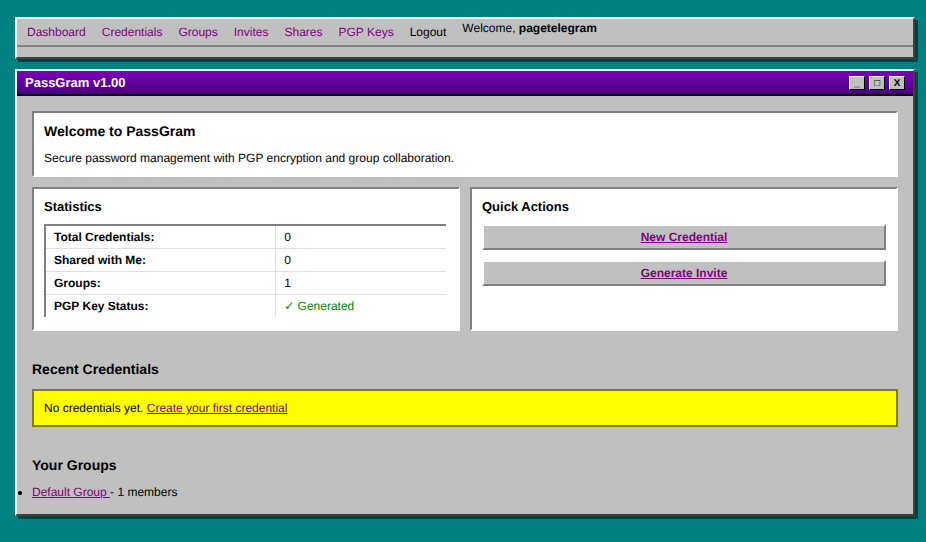
Secure Password Manager with PGP Encryption & Group Collaboration PassGram is a standalone PHP password manager featuring group-based credential sharing, PGP encryption using native PHP OpenSSL, encrypted JSON file storage, and an invite-only registration system. All styled with an authentic OS/2 Warp 3.0 interface with purple title bars.Features
Core Functionality
- ✅ Encrypted Password Storage - AES-256-GCM encryption for all credentials
- ✅ Group Collaboration - Users belong to groups and can share credentials
- ✅ Complete Group Management - Create, edit, delete groups, add/remove members, transfer ownership
- ✅ Group-Level Credential Sharing - Share credentials with entire groups (read-only or read/write permissions)
- ✅ PGP Key Management - Generate RSA, DSA, or Elliptic Curve keys with configurable sizes
- ✅ Multiple Encryption Options - RSA (2048/3072/4096), DSA, EC (secp384r1/secp521r1/prime256v1)
- ✅ Credential Sharing - Share passwords with group members using PGP encryption
- ✅ Invite-Only Registration - Secure invite codes tied to specific groups
- ✅ Notes System - Add notes to users (group-visible) and credentials (private)
- ✅ Multi-Field Credentials - Store passwords, usernames, URLs, custom fields, tags
- ✅ Password Generator - Built-in secure random password generator
- ✅ Copy-to-Clipboard - One-click copying for credentials, invites, URLs, and PGP keys
- ✅ Persistent Navigation - Dashboard menu accessible on all pages when logged in
- Master Application Key (MAK) - Encrypts all JSON database files
- User Master Password - Never stored, only hashed (bcrypt + Argon2id)
- Field-Level Encryption - Sensitive credential fields encrypted individually
- PGP Public Key Cryptography - For secure credential sharing between users
- CSRF Protection - All state-changing operations protected
- Rate Limiting - Brute force protection on authentication
- Session Security - Secure, httponly, samesite cookies
- Comprehensive Logging - Audit trail of all security events
- OS/2 Warp 3.0 Theme - Authentic purple title bars (#5D009D), beveled borders, classic gray backgrounds
- Server-Side Rendered - Traditional PHP approach, works without JavaScript
- Enhanced User Experience - Copy buttons, show/hide passwords, dynamic forms
- Responsive Design - Works on desktop and mobile devices
- PHP 7.4+ (PHP 8.x recommended)
- OpenSSL Extension (standard on all servers)
- JSON Extension (standard on all servers)
- Writable
data/directory for encrypted storage - HTTPS (required for production - configured in web server)
Security Features
User Interface
System Requirements
Installation
1. Upload Files
Transfer all PassGram files to your web server. Thepublic/ directory should be your web root.
your-domain.com/
├── public/          ← Point your web server here
├── src/
├── data/
├── config/
├── autoload.php
└── install.php
2. Set Permissions
bash
chmod 700 data/
chmod 700 config/
chmod 644 public/.htaccess
3. Run Installation
Visithttps://your-domain.com/install.php in your browser.
The installer will:
config/security.php to a secure location
install.php after successful installation
4. Configure Web Server
Apache (.htaccess already included): Point DocumentRoot to/public/ directory.
Nginx:
nginx
server {
    listen 443 ssl;
    server_name your-domain.com;

    root /path/to/passgram/v1.00/public;
    index index.php;

    location / {
        tryfiles $uri $uri/ /index.php?$querystring;
    }

    location ~ \.php$ {
        fastcgi_pass unix:/var/run/php/php8.1-fpm.sock;
        fastcgi_index index.php;
        include fastcgi_params;
    }

    # Block access to sensitive directories
    location ~ ^/(config|data|src)/ {
        deny all;
    }
}
5. Update Configuration
Editconfig/config.php:
base_url to your domain
cookie_secure when using HTTPS
Directory Structure
v1.00/
├── autoload.php                 # Standalone PSR-4 autoloader
├── install.php                  # Installation script (delete after install)
├── public/                      # Web root
│   ├── index.php               # Main entry point
│   ├── login.php               # Login page
│   ├── logout.php              # Logout handler
│   ├── assets/
│   │   ├── css/style.css       # OS/2 Warp 3.0 theme
│   │   └── js/app.js           # Client-side interactions
│   └── .htaccess               # Apache security & rewrite rules
├── src/                         # Application code
│   ├── Core/                   # Core infrastructure
│   │   ├── Config.php          # Configuration loader
│   │   ├── Database.php        # Encrypted JSON file operations
│   │   └── Session.php         # Secure session management
│   ├── Security/               # Security components
│   │   ├── Encryption.php      # AES-256-GCM encryption
│   │   ├── PGP.php            # Native PHP OpenSSL RSA operations
│   │   ├── Auth.php           # Authentication
│   │   └── CSRF.php           # CSRF protection
│   ├── Models/                 # Data models
│   │   ├── User.php           # User management
│   │   ├── Group.php          # Group management
│   │   ├── Invite.php         # Invite code system
│   │   ├── Credential.php     # Password storage
│   │   ├── Share.php          # PGP-encrypted sharing
│   │   └── Note.php           # Notes system
│   └── Helpers/                # Utility classes
│       ├── Validator.php       # Input validation
│       ├── Sanitizer.php       # XSS prevention
│       └── Logger.php          # Activity logging
├── data/                        # Encrypted storage (outside web root)
│   ├── users.json.enc          # Encrypted user database
│   ├── groups.json.enc         # Encrypted groups
│   ├── invites.json.enc        # Encrypted invites
│   ├── credentials/            # Per-user credential files
│   ├── shares/                 # Shared credential metadata
│   ├── notes/                  # Notes storage
│   ├── pgp/                    # PGP keys
│   └── logs/                   # Activity logs
└── config/                      # Configuration files
    ├── config.php              # Main configuration
    ├── database.php            # Storage paths
    └── security.php            # Master key & crypto settings
Usage
First Steps
Credential Types
PassGram supports multiple credential types:Sharing Credentials with Groups
Revoking Group Access
Managing Groups
As a group owner, you can:Group Notes
Add notes about users visible to all group members:Credential Notes
Add private notes to any credential:PGP Key Options
When generating PGP keys, choose from multiple encryption algorithms: RSA (Recommended)Security Considerations
Master Application Key (MAK)
config/security.php securely offline
User Master Password
HTTPS
Always use HTTPS in production. Password managers should never run over HTTP.Backups
Backup these regularly:config/security.php - Contains MAK
data/ directory - All encrypted data
Development Status
✅ Version 1.00 - Fully Completed
Core InfrastructureTechnical Details
No Dependencies
PassGram is completely standalone:Encryption Architecture
Layer 1: Master Application KeyData Storage
All data stored in encrypted JSON files:License
PassGram v1.00 - Copyright 2025Support
For issues, questions, or contributions, please contact the developer. --- PassGram v1.00 - Secure. Simple. Standalone.Download Options
Donation-Based Downloads: Support development with a donation via PayPal to receive source code and compiled binaries.
Source Code (Donation-Based)
Changelog
Changelog
All notable changes to PassGram will be documented in this file. The format is based on Keep a Changelog, and this project adheres to Semantic Versioning.[1.00] - 2025-12-20
Initial Release
PassGram v1.00 is a complete, production-ready password manager with group collaboration, PGP encryption, and OS/2 Warp 3.0 styling.Added
#### Core Features- Encrypted Password Storage - AES-256-GCM encryption for all credentials
- Group Collaboration - Users belong to groups and can share credentials
- PGP Key Management - Generate and manage encryption keys
- Invite-Only Registration - Secure invite codes tied to specific groups
- Notes System - User notes (group-visible) and credential notes (private)
- Multi-Field Credentials - Store passwords, usernames, URLs, custom fields, tags
- Password Generator - Built-in secure random password generator #### Group Management (Complete CRUD)
- Create new groups with name and description
- Edit existing groups (name, description)
- Delete groups (with confirmation, owner only)
- Add members to groups by username
- Remove members from groups (with confirmation)
- Transfer group ownership to another member
- View all group members with roles
- List all user's groups #### Group-Level Credential Sharing
- Share credentials with entire groups (not just individuals)
- Permission levels: - Read Only - Members can view the credential - Read & Write - Members can view and edit the credential
- Revoke group access instantly
- View which groups have access to each credential
- Credentials list shows ownership status (Owner/Shared)
- Credentials list shows access level for shared items #### PGP Encryption Options
- Multiple Algorithms: - RSA - 2048, 3072, or 4096 bits (recommended) - DSA - 2048, 3072, or 4096 bits (legacy) - Elliptic Curve - secp384r1, secp521r1, prime256v1 (modern)
- Dynamic form with algorithm selection
- Real-time security level display
- Algorithm and key size stored with user record
- PGP view page displays actual algorithm used
- Educational information about each algorithm #### User Experience Enhancements
- Copy-to-Clipboard Buttons throughout application: - Invite codes (both code and full registration URL) - Credential usernames - Credential passwords - Credential URLs - PGP public keys - PGP fingerprints
- Persistent Navigation Menu - Dashboard menu accessible on all pages when logged in
- Show/Hide Passwords - Toggle password visibility in credential view
- Dynamic Forms - PGP generation form updates based on algorithm selection
- Improved Layouts - Flexbox layouts for better button placement #### Security Infrastructure
- Master Application Key (MAK) - Encrypts all JSON database files with AES-256-GCM
- User Master Password - Never stored, only hashed (bcrypt for auth, Argon2id for key derivation)
- Field-Level Encryption - Sensitive credential fields encrypted individually
- PGP Public Key Cryptography - For secure credential sharing between users
- CSRF Protection - All state-changing operations protected with tokens
- Session Security - Secure, httponly, samesite=strict cookies with 60-minute timeout
- Comprehensive Logging - Audit trail of all security events and admin actions
- Input Validation - All user input validated and sanitized
- XSS Prevention - htmlspecialchars() used on all output #### Core Infrastructure
- Standalone PSR-4 Autoloader - No Composer required
- Config System - Hierarchical configuration with environment support
- Database Layer - Encrypted JSON file operations with atomic writes
- Session Management - Secure PHP sessions with static helper class
- Authentication System - Password hashing, session management, user verification
- Encryption Class - AES-256-GCM with Argon2id key derivation
- PGP Class - Native PHP OpenSSL for RSA/DSA/EC operations
- CSRF Protection - Token generation and validation
- Validator - Email, username, password validation with error handling
- Sanitizer - XSS prevention and input cleaning
- Logger - File-based activity logging with levels #### Data Models
- User Model - Create, read, update, delete users; password management; group membership; PGP key info
- Group Model - Full CRUD operations; member management; ownership transfer
- Credential Model - Full CRUD; group sharing; permission checking; accessible credentials
- Invite Model - Generate invite codes; validate; track usage
- Share Model - PGP-encrypted credential sharing between users
- Note Model - User notes and credential notes #### Controllers
- AuthController - Login, registration, logout, session management
- DashboardController - Main dashboard with statistics and quick actions
- CredentialController - Full CRUD operations plus group sharing/revoking
- GroupController - Complete group management including transfer ownership
- InviteController - Generate and list invite codes
- PGPController - Generate keys with multiple algorithms, view keys
- ShareController - Share credentials with PGP encryption
- NoteController - Manage user and credential notes #### Views (OS/2 Warp 3.0 Styled)
- Layouts - Header with persistent navigation, footer
- Authentication - Login, register pages with OS/2 styling
- Dashboard - Overview with quick stats and action buttons
- Credentials - List (with filtering), view, create, edit pages
- Groups - List, view (with member management), create, edit pages
- Invites - List with generation form and copy buttons
- PGP - Generate (with algorithm options), view (with copy/download)
- Notes - Forms for user and credential notes #### User Interface
- OS/2 Warp 3.0 Theme: - Purple title bars (#5D009D) - Beveled borders (3D effect with outset/inset) - Classic gray backgrounds (#C0C0C0) - System fonts (monospace for code) - Classic button styles with :active states - Window-style containers - Traditional form controls
- Responsive Design - Works on desktop and mobile
- JavaScript Enhancements: - Copy-to-clipboard with notifications - Show/hide password functionality - Dynamic form updates (PGP generation) - Notification system (success/error messages) #### Installation
- install.php - Interactive installation wizard with OS/2 styling
- Generates Master Application Key
- Creates first admin user
- Creates default group
- Generates first invite code
- Initializes encrypted database structure #### Configuration
- config/config.php - Main application configuration
- config/database.php - Storage paths configuration
- config/security.php - Master key and crypto settings (generated by installer)
- .htaccess - Apache security headers and rewrite rules #### Documentation
- README.md - Comprehensive documentation with installation, usage, security considerations
- CHANGELOG.md - This file, documenting all changes
- Inline Comments - PHP docblocks on all classes and methods
- Master Application Key - All JSON files encrypted at rest
- User Master Password - Derives keys for private PGP key encryption
- PGP Encryption - For credential sharing between users
- Field-Level - Sensitive credential fields encrypted individually #### Password Security
- Authentication: bcrypt hash (cost factor 12)
- Key Derivation: Argon2id (memory: 65536 KB, time: 4, threads: 2)
- Never stored in plain text anywhere
- 12+ character minimum with complexity requirements #### Data Storage
- All data in encrypted JSON files
- No SQL database required or used
- Atomic write operations with file locking
- Per-user credential files for scalability
- Proper file permissions (700 for data/, 600 for sensitive files)
- PHP 7.4+ (PHP 8.x recommended)
- OpenSSL extension (standard)
- JSON extension (standard)
- Writable data/ directory
- HTTPS (required for production) #### No External Dependencies
- No Composer packages
- No npm packages
- Pure PHP implementation
- Native OpenSSL for cryptography
- Standalone autoloader included #### File Structure
Security Considerations
#### Encryption LayersTechnical Details
#### Requirements
v1.00/
├── autoload.php
├── install.php
├── public/
│   ├── index.php
│   ├── login.php
│   ├── logout.php
│   ├── assets/
│   │   ├── css/style.css
│   │   └── js/app.js
│   └── .htaccess
├── src/
│   ├── Core/
│   ├── Security/
│   ├── Models/
│   ├── Controllers/
│   ├── Views/
│   └── Helpers/
├── data/
│   ├── users.json.enc
│   ├── groups.json.enc
│   ├── invites.json.enc
│   ├── credentials/
│   ├── shares/
│   ├── notes/
│   ├── pgp/
│   └── logs/
└── config/
    ├── config.php
    ├── database.php
    └── security.php